How to perform Collapsed As-Built / As-Built But-For Schedule Delay Analysis in Primavera P6

How to perform Collapsed As-Built / As-Built But-For Schedule Delay Analysis in Primavera P6

Introduction

An Collapsed As-Built / As-Built But-For Schedule Delay Analysis (ABBF) is a retrospective CPM schedule delay analysis technique that determines the earliest date that the required project completion activity, or various milestone activities could have been achieved but-for the owner-caused delays that occurred during the project. The amount of owner-caused delay determined from the ABBF Schedule Delay Analysis quantifies the contractor’s entitlement to receive compensable delay damages. Similarly, the analysis could determine the earliest date that the various completion activities could have been achieved but-for the contractor-caused noncompensable delays that occurred during the project.

The ABBF Schedule Delay Analysis is typically more difficult to perform than the Time Impacted Analysis because most CPM software programs regard as-built dates as  historical events fixed in time. As a result, most CPM software programs will not permit but-for analysis models to be run on schedule containing actual dates. Consequently, the as-built schedule must be converted to an as-planned format containing “planned” dates that correspond to the as-built schedule but are driven by logic and activity durations. This conversion step is used to create an As-Built Calculation Schedule that can collapse as delays are removed.

The ABBF Schedule Delay Analysis is performed by first removing owner-caused delays from the As-Built Calculation Schedule and recalculating the project completion date. Contractor-caused (noncompensable) and excusable (force majeure, acts of God…) delays are left in the As-Built Calculation Schedule. The As-Built Calculation Schedule with owner-caused delays removed is used to determine the compensable time period between the actual project completion date and the as-built but-for completion date.

Next, contractor-caused delays are removed from the original As-Built Calculation Schedule and the project completion date is recalculated. Owner-caused (compensable) and excusable (force majeure, acts of God…) delays are left in the As-Built Calculation Schedule. The ABBF Schedule Delay Analysis that removes contractor-caused delays is used to determine the time period between the actual completion date and the as-built but-for completion date for assessment of liquidated damages by the owner.

Why we need this method

It is a common misconception in the construction industry that if the contractor is entitled to an extension of time, then it is also automatically entitled to be compensated for the additional time that it has taken to complete the contract. It is usually not.

Advertisements

about:blank

Report this ad

An additive delay analysis, such as the Time Impacted Analysis, by itself does not provide an answer to the issue of compensable delay. If a contractor incurs additional costs that are caused by both owner delay and concurrent contractor delay, then the contractor should only recover compensation to the extent it is able to separately identify the additional costs that were only caused by the owner delay. If it would have incurred the additional costs in any event as a result of concurrent contractor-caused delays, the contractor will not be entitled to recover those additional costs unless provided otherwise in the contract. Therefore, the ABBF Schedule Delay Analysis is often performed to address the issue of compensable delay net of concurrent contractor-caused delay on the as-built schedule, which the Time Impated Analysis do not analyze properly.

How to perform Collapsed As-Built, As-Built But-For Schedule Delay Analysis in Primavera P6-14
Source: As-Built But-For Schedule Delay Analysis – Richard J. Long, P.E. – Long International, Inc.

Data Requirement

We will demonstrate this method by using a simple House project as below.

The House project has an As-Planned schedule like following picture:

How to perform Collapsed As-Built, As-Built But-For Schedule Delay Analysis in Primavera P6-1

Project duration is 40 days.

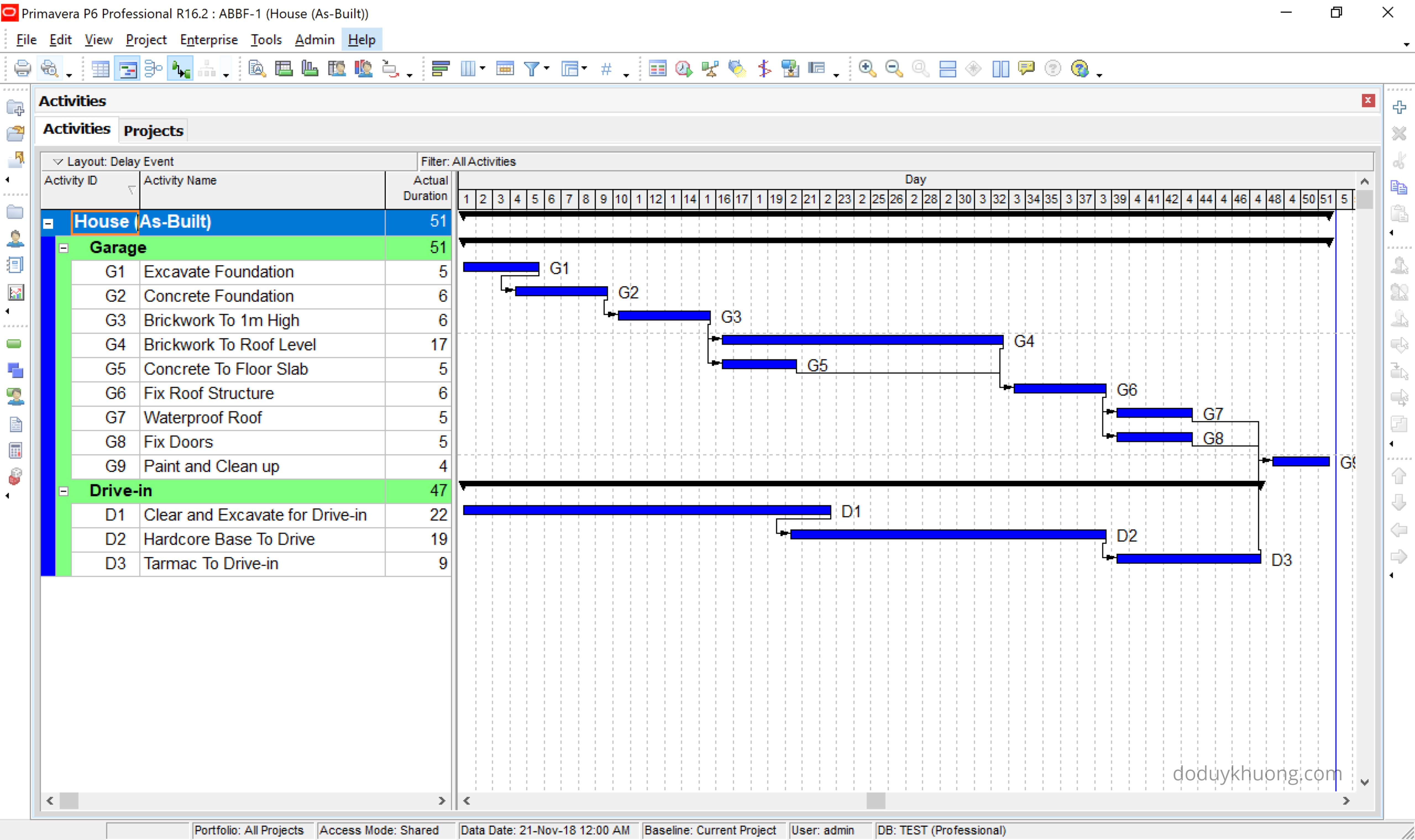
The project finished and As-Built schedule is as below:
How to perform Collapsed As-Built, As-Built But-For Schedule Delay Analysis in Primavera P6-2

Actual project duration is 51 days.

Advertisements

about:blank

Report this ad

This As-Built schedule already included all delay events which is documented in below table:

How to perform Collapsed As-Built, As-Built But-For Schedule Delay Analysis in Primavera P6-3
Source: Construction Delay Analysis Technique – A Review of Application Issues and Improvement Needs – Nuhu Braimah

Type of Delay:

  • NN (Nonexcusable–Noncompensable): Contractor-caused delay
  • EC (Excusable Compensable): Owner-caused delay

Create As-Built Calculation Schedule

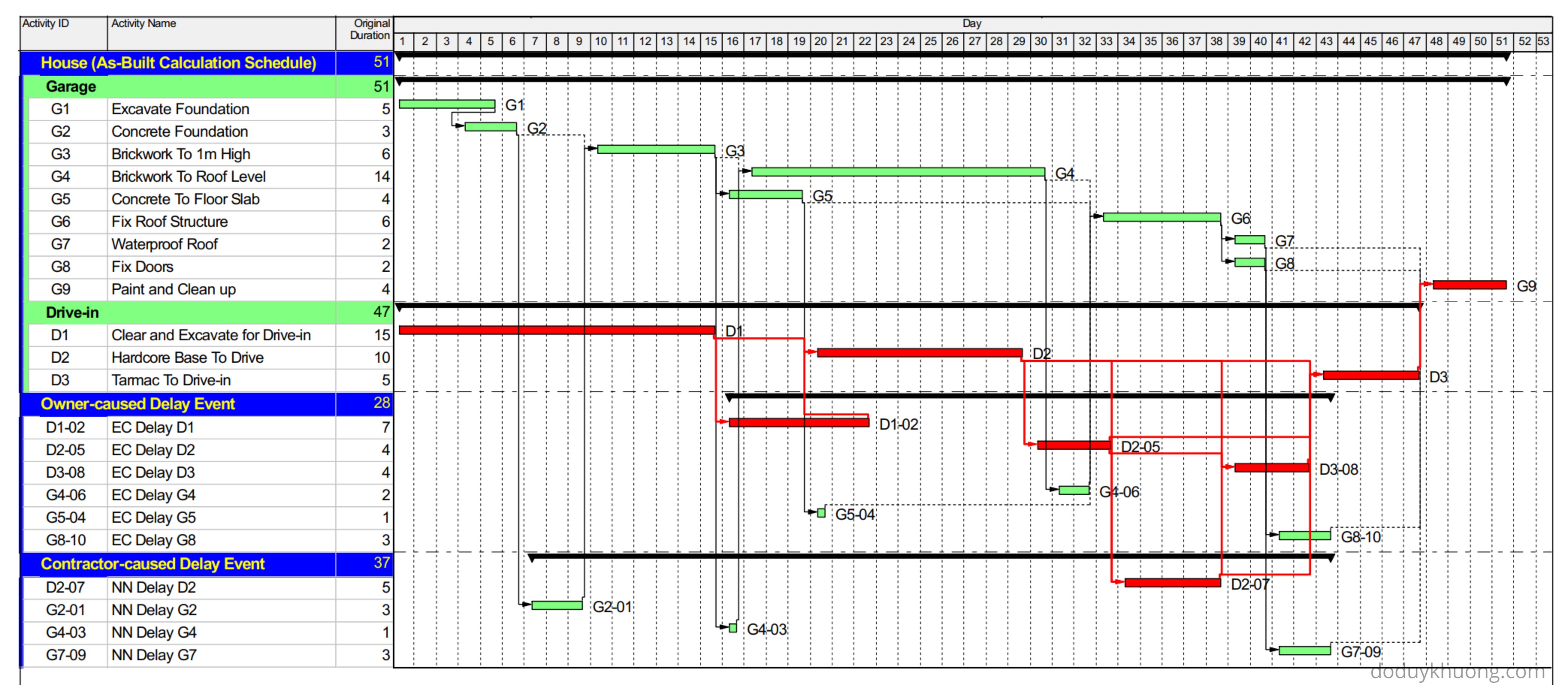
Create another As-Planned schedule which has Start/Finish date look like As-Built schedule. This schedule is called “As-Built Calculation Schedule”

Separate delay events to a different project so that later we can exclude them.

We created 1 project (As-Built Calculation Schedule) and 2 projects (contain Owner-caused delay and Contractor-caused delay):

How to perform Collapsed As-Built, As-Built But-For Schedule Delay Analysis in Primavera P6-4

Opening 3 projects we have this schedule:
How to perform Collapsed As-Built, As-Built But-For Schedule Delay Analysis in Primavera P6-8

Using Activity Code function to put delay event next to activity, we have this view:

How to perform Collapsed As-Built, As-Built But-For Schedule Delay Analysis in Primavera P6-9

We can see that Start/Finish date (of each activity and whole project) and relationship of As-Built Calculation Schedule now look exactly the same with As-Built schedule.

Create Collapsed As-Built report

Contractor’s point of view (As-Built But For Owner):

Under this, all owner-caused delays were subtracted from the As-Built Calculation Schedule.

Advertisements

about:blank

Report this ad

We open 2 projects: “House (As-Built Calculation Schedule)” and “Contractor-caused Delay Event”

How to perform Collapsed As-Built, As-Built But-For Schedule Delay Analysis in Primavera P6-10

Reschedule then we have this report:

How to perform Collapsed As-Built, As-Built But-For Schedule Delay Analysis in Primavera P6-11

The collapsed as-built schedule has completion date as day 45.

With actual completion date as day 51, the owner is responsible for 6 days (51–45) of the  project delay, which could be charged as compensable delay.

With original (baseline) completion date as day 40, the contractor is responsible for 5 days (45–40) of the  project delay.

Owner’s point of view (As-Built But For Contractor):

Under this, all contractor-caused delays were subtracted from the As-Built Calculation Schedule.

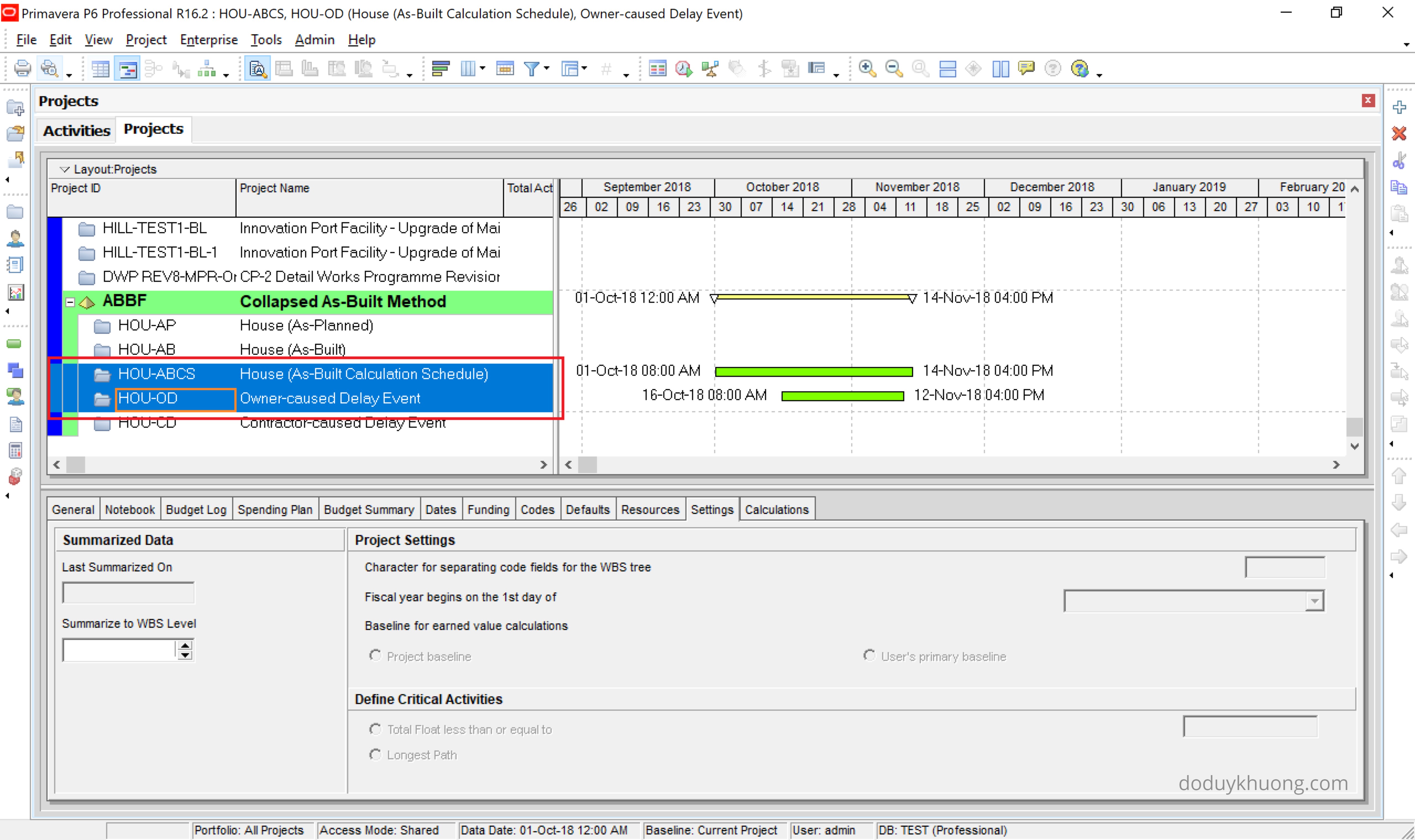
We open 2 projects: “House (As-Built Calculation Schedule)” and “Owner-caused Delay Event”
How to perform Collapsed As-Built, As-Built But-For Schedule Delay Analysis in Primavera P6-12

Reschedule then we have this report:

How to perform Collapsed As-Built, As-Built But-For Schedule Delay Analysis in Primavera P6-13

The collapsed as-built schedule has completion date as day 46.

With actual completion date as day 51, the contractor is responsible for 5 days (51–46) of the project delay, which could be charged for liquidated damages.

With original (baseline) completion date as day 40, the owner is responsible for 6 days (46–40) of the  project delay.

References:

  • The project data and delay events is taken from “Construction Delay Analysis Technique —A Review of Application Issues and Improvement Needs” – Nuhu Braimah
  • As-Built But-For Schedule Delay Analysis – Richard J. Long, P.E. – Long International, Inc.

Typical Delay Analysis Methods in Construction Claims

Typical Delay Analysis Methods in Construction Claims

This article addresses the concepts of several typical delay analysis methods in construction claims.

Why do we need Delay Analysis in Construction Claims?

Because The Delay Must Affect The Critical Path

The Construction Contracts often state that no adjustment to the critical milestones dates or the scheduled completion dates would be made unless the delay affects a critical path activity.

This concept is consistent with industry practice, as stated in the SCL Delay and Disruption Protocol 2nd Edition, page 6: “Unless there is express provision to the contrary in the contract, where there is remaining total float in the programme at the time of an Employer Risk Event, an EOT [Extension of Time] should only be granted to the extent that the Employer Delay is predicted to reduce to below zero the total float on the critical path affected by the Employer Delay to Completion (i.e. if the Employer Delay is predicted to extend the critical path to completion).”

AACE (International Recommended Practice No. 29R-03 Forensic Schedule Analysis, April 25, 2011, Section 1.5, B.6 Delay Must Affect the Critical Path, page 18) addresses this requirement: “In order for a claimant to be entitled to an extension of contract time for a delay event (and further to be considered compensable), the delay must affect the critical path. This is because before a party is entitled to time-related compensation for damages it must show that it was actually damaged. Because conventionally a contractor’s delay damages are a function of the overall duration of the project, there must be an increase in the duration of the project.”

So, if the effect of adding any delays to the schedule is that float is consumed, but no actual delay to the completion of the project results from adding the delays, then the Contractor has no time extension entitlement.

Delay Analysis Methods

Delay analysis can be performed by a few methods.

The Society of Construction Law (SCL) Protocol 2nd Edition (Guidance Part B, paragraph no. 11) lists six common methods described in the table below.

Delay Analysis methods according to SCL Delay & Disruption Protocol

AACE International’s Recommended Practice No.29R-03 for Forensic Schedule Analysis (RP 29R-03) lists nine different methods described in the table below.

Delay Analysis methods according to AACE International’s Recommended Practice No.29R-03

Concepts of Typical Delay Analysis Methods

1. Time Slice Windows Analysis

What is Time Slice Windows Analysis:

Time Slice Windows Analysis is an observational, windows-based methodology that focuses on comparing as-planned, updated and as-built project schedules to identify and quantify delays to the critical path of the project.

The Purpose of the Analysis:

  • This methodology is a retrospective analysis that uses the project schedule updates to quantify the slippage to the critical path during a select period of time;
  • Once all critical path activity delays have been quantified, the origins and causes of each delay are determined. The responsibility for each delay is then apportioned to either the Contractor, Owner, a third party, if appropriate, and to force majeure or other excusable delays defined by the contract.

Steps For Performing:

  • Select schedule windows;
  • Identify the critical path;
  • Perform a detailed review of the schedules selected for the analysis;
  • Determine the changes made between the schedules selected for the schedule windows;
  • Develop variance tables to calculate date and duration variances;
  • Research activity impacts and allocate responsibility for delays.

Time Slice Windows Analysis Illustration:

The figure below illustrates how the Time Slice Windows Analysis method work. In the first window, the delay is quantified by comparing the planned finish date and the actual finish date of Activity A.

Time Slice Windows Analysis Illustration

2. Time Impact Analysis

What is Time Impact Analysis:

Time Impact Analysis is a schedule delay analysis technique that adds delays or changes to the schedule which are updated up to the day before the delay occurred.

The Purpose of the Analysis:

  • To determine whether the overall completion date of the project is delayed, or remains the same as a result of the delays;
  • To demonstrate a Contractor’s entitlement to a time extension;
  • To demonstrate a potential schedule acceleration;
  • To demonstrate an Owner’s entitlement to receive liquidated damages.

Steps For Performing:

  • Develop a fragnet to model the delay;
  • Obtain the approved schedule which is updated up to the day before the delay occurred;
  • Insert the fragnet into the approved schedule update and link to the impacted activities;
  • Recompute the schedule and note a change in the project completion date;
  • Determine the amount of project delay.

Time Impact Analysis Illustration:

The figure below illustrates how the TIA method work. After identifying the right Monthly Project Schedule, the delay is added to the schedule to impact the project completion date. The variance of project completion date between the Monthly Project Schedule and the Time Impact Schedule is the Time Extension.

Time Impact Analysis Illustration

3. Collapsed As-Built / As-Built But-For Analysis

What is Collapsed As-Built Analysis:

Collapsed As-Built Analysis is a retrospective schedule delay analysis technique that determines the earliest date that the project completion date, or a required milestone could have been achieved but-for the owner-caused / contractor-caused delays that occurred during the project.

The Purpose of the Analysis:

  • To determine the compensable time extension by taking into account the concurrent delay situation;
  • The Collapsed As-Built Analysis that removes contractor-caused delays is used to determine the time period between the actual completion date and the Collapsed As-Built completion date for assessment of liquidated damages by the owner.

Steps For Performing:

  • Develop a model of the as-built schedule, which is called the As-Built Calculation Schedule;
  • Identify the owner-caused or contractor-caused delay;
  • Interpret the results of removing delays from the As-Built Calculation Schedule.

Collapsed As-Built Analysis Illustration:

The figure below illustrates how the Collapsed As-Built Analysis method work. The As-Built Calculation Schedule incorporates both owner-caused and contractor-caused delays. The period between the As-Planned Schedule and the As-Built Calculation Schedule is “Overall Time Extension”. After removing the Owner-caused Delay, the As-Built Calculation Schedule completion date collapses to an earlier completion date. The period between the As-Built Calculation Schedule and the Collapsed As-Built Schedule is the “Time Extension caused by the Owner-caused Delay”.

Typical Delay Analysis Methods in Construction Claims Collapsed as built, as built but for analysis
Collapsed As-Built Analysis Illustration